
Many users often search for “Wa Sender Google Map Data Extractor not working” because they think the tool has stopped functioning. In reality, the extractor is still working properly, but a small manual step is required to make it run smoothly.
In this detailed guide, you will learn why this issue happens, how to fix it step by step, and how to continue generating unlimited leads from Google Maps without any interruption.
This blog post explains everything clearly, even if you are using the Google Map Lead Extractor for the first time.
Understanding the Google Map Data Extractor Issue
When users start the Google Map Data Extractor, they expect the software to automatically place the search keyword inside the Google Maps search box. However, in some cases, this automatic action does not occur.
Because the search box remains empty, many users assume that the extractor is broken or not working anymore. This creates confusion, especially for marketers who rely on Google Maps for business lead generation.
The truth is simple:
The extractor engine is active and fully functional.
Only the search query needs to be entered manually.
Once this step is done, the extraction process starts normally.
How the Google Map Lead Extractor Actually Works
The Google Map Lead Extractor works by collecting publicly available business data from Google Maps. This includes business names, phone numbers, addresses, categories, and sometimes websites.
The software depends on Google Maps search results. If the search query is not entered, Google Maps has nothing to display, and therefore, the extractor has no data to collect.
That is why manually entering the keyword instantly solves the problem.
Step-by-Step Solution: How to Fix Google Map Data Extractor
Step 1: Open Google Map Data Extractor Inside Wa Sender
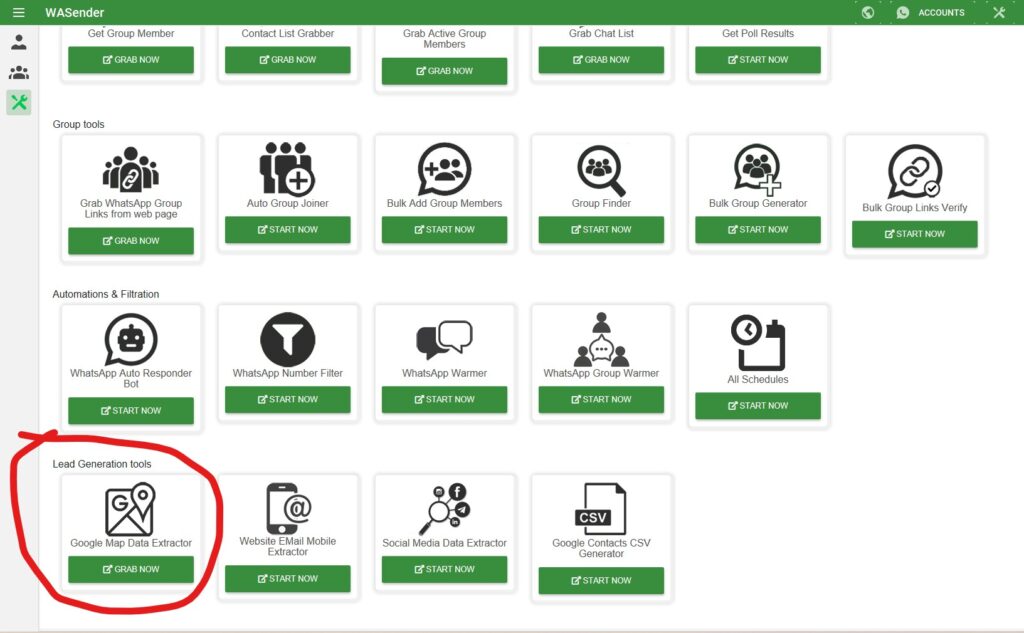
First, open the software and navigate to the Google Map Data Extractor section.
Here, you will see an input field where you can write your target keyword, such as a business type and location.
Example keywords:
- SEO agency in London
- Restaurant in Dubai
- Real estate agent in New York
Enter your desired keyword carefully.
Step 2: Click the Start Button
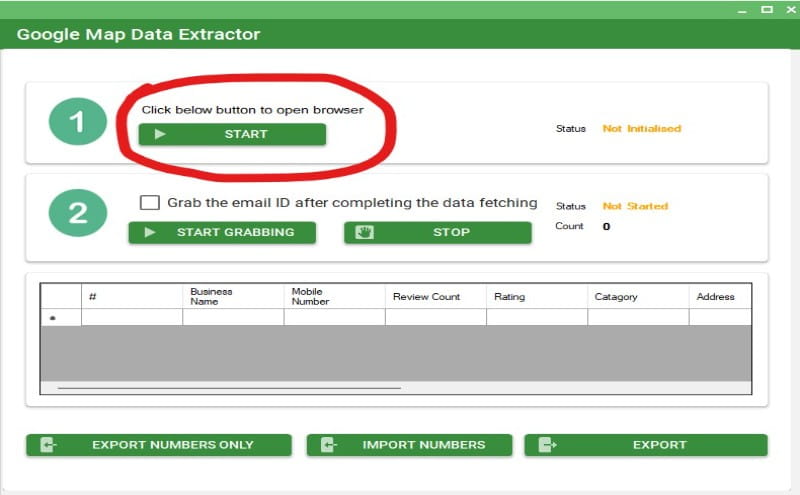
After entering the keyword, click on the Start button.
Google Maps will open automatically in your browser.
At this stage, you may notice that the search box is empty. This is where most users think the tool is not working.
Do not close the tool or stop the process.
Step 3: Manually Enter the Search Keyword in Google Maps
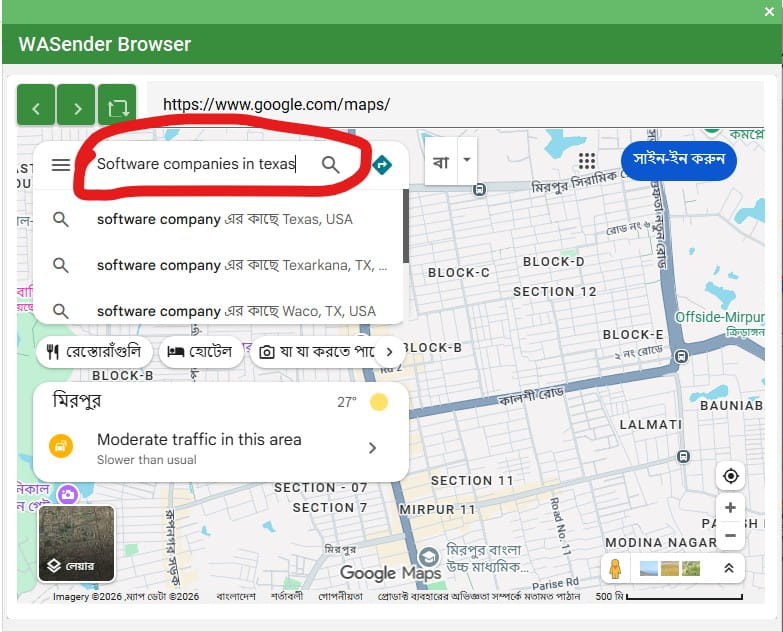
Now, simply copy the same keyword you entered earlier and paste it directly into the Google Maps search box.
You can also type it manually.
Once you press Enter, Google Maps will load business results instantly.
This small manual action activates the entire extraction process.
Step 4: Lead Extraction Starts Automatically
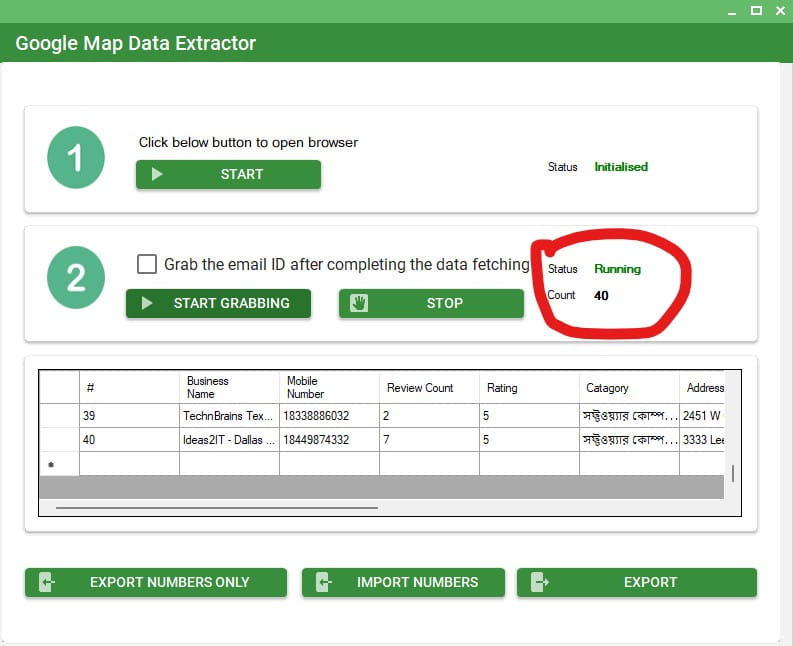
As soon as the results appear, the extractor will start collecting data automatically.
You will see businesses being captured one by one.
The extractor can collect:
- Business names
- Phone numbers
- Addresses
- Categories
- Websites (if available)
You can scroll down Google Maps to load more results and extract even more leads.
Can You Generate Unlimited Leads from Google Maps?
Yes, you can.
Since the extractor pulls data directly from Google Maps listings, you can continue scrolling and loading new businesses. As long as results are available, the extractor will keep working.
This makes it an excellent solution for:
- Local business lead generation
- WhatsApp marketing campaigns
- Cold outreach
- Digital marketing agencies
- Freelancers and consultants
Why This Is Not a Serious Problem
This is not a data extraction failure or scraping issue.
It is only a search input automation limitation, which does not affect the core functionality of the tool.
Once the keyword is placed inside Google Maps, everything works exactly as expected.
Future updates may fully automate this step again, but until then, this workaround ensures uninterrupted lead generation.
Why Wa Sender Is Still a Powerful Marketing Tool
Wa Sender is designed to help marketers automate and scale their outreach efforts.
Beyond Google Map lead extraction, it supports multiple marketing workflows that save time and increase efficiency.
The software is widely used for:
- WhatsApp bulk messaging
- Group member extraction
- Contact filtering
- Automated replies
- Lead data organization
When combined with Google Maps leads, it becomes a complete marketing solution.
Who Should Use Google Map Lead Extraction?
This feature is ideal for:
- Digital marketers
- Agency owners
- Affiliate marketers
- Local service providers
- B2B outreach campaigns
If your goal is to reach real businesses with verified contact details, Google Maps is one of the best data sources available.
Order Wa Sender
If you want to use Google Map Lead Extraction along with WhatsApp marketing automation, you can order the software from the official page below:
Final Conclusion
If you were worried because Wa Sender Google Map Data Extractor is not working, now you know the real reason.
The tool works perfectly.
Only a small manual step is required to activate Google Maps search.
Once done, you can continue extracting leads without limits and without disruption.
This solution ensures your lead generation campaigns stay active and productive.
Website Traffic & Value Estimator
Want More Guides Like This?
Follow Marketing Tools Club YouTube Channel for in-depth tutorials on:
- WhatsApp Marketing
- Google Map Lead Generation
- Automation & Marketing Tools